
How to Launch a Dropshipping Store in 10 Minutes
How to Launch a Dropshipping Store in 10 Minutes
Yes, you can launch a dropshipping store in about 10 minutes, and xPage Drop is built specifically to make that possible. Pick a product, let the platform generate your store, set your price, and accept your first payment without needing your own Stripe account or a warehouse full of inventory.
The 10-minute version works like this: choose a product from the connected catalog, let xPage generate your store and copy, set your margin, activate checkout, and publish. You're not building a 40-page catalog in 10 minutes, you're getting one product live and ready to take an order, which is exactly what you need to start testing demand.
Below is the real step-by-step process inside xPage Drop, what to expect at each stage, and how to avoid the two things that kill most fast launches: picking a product with no demand, and getting stuck at checkout because you don't have a payment gateway yet.
Can You Really Build a Store That Fast?
A few years ago, no. Getting a store live used to mean piecing together a domain, a theme, product copy, and a supplier connection, realistically a few hours of work at minimum.
xPage's AI dropshipping store builder changes that math. It generates a complete store homepage, product page, and copy, directly from a product listing, which is what makes a genuine 10-minute build possible for a single product. That's how xPage positions itself: an AI-powered platform built to generate high-converting stores and product landing pages in minutesxPage is an AI-powered eCommerce platform that builds high-converting online stores and product landing pages in minutes, with no code needed, rather than hours or days.
10 minutes is realistic when you're launching one product, not a full catalog, which is also the smarter way to start anyway (more on that below).
The 10-Minute Launch, Step by Step
Here's what actually fits inside a 10-minute build session with xPage Drop:
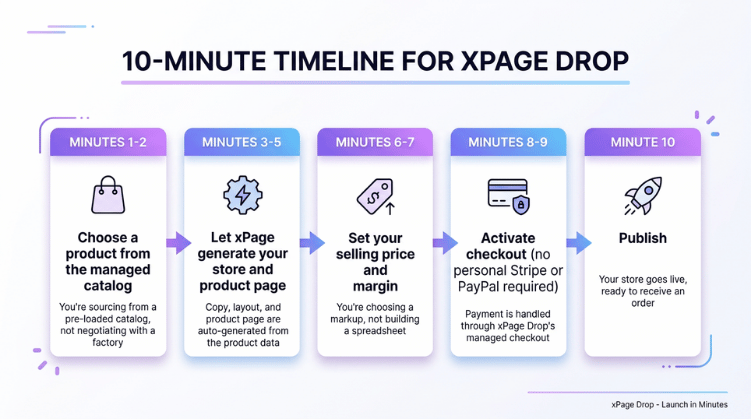
This is the difference between "build a dropshipping store" the old way and doing it in one sitting: every step above used to be its own separate tool, login, and approval process.
What You Need Before You Start
You don't need a company, a warehouse, or thousands of dollars. You need three things:
- One product you're reasonably confident has demand (more on finding it below)
- A small testing budget — realistically $20–$75 to start (covered in the next section)
- A way to accept payments that doesn't require weeks of approval
Here's what a realistic starting budget looks like, based on current beginner guides:
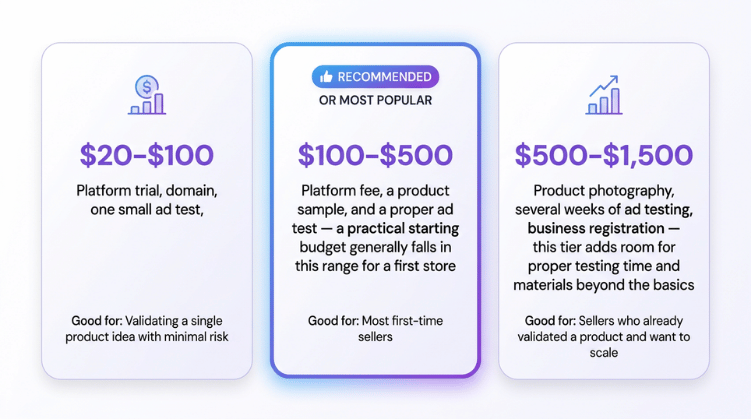
The point isn't to spend more,it's to know what you're actually paying for before you start dropshipping today instead of guessing.
Why the "Launch Fast, Test Fast" Model Works
Speed isn't just about convenience. The faster you can get a one product store live in xPage Drop, the faster you find out whether a product is worth your time, before you've sunk a month into it.
Most experienced sellers don't fall in love with one product. They test several in parallel and expect most to fail. That's normal, not a sign you did something wrong.
Testing a Product Without Wasting Money
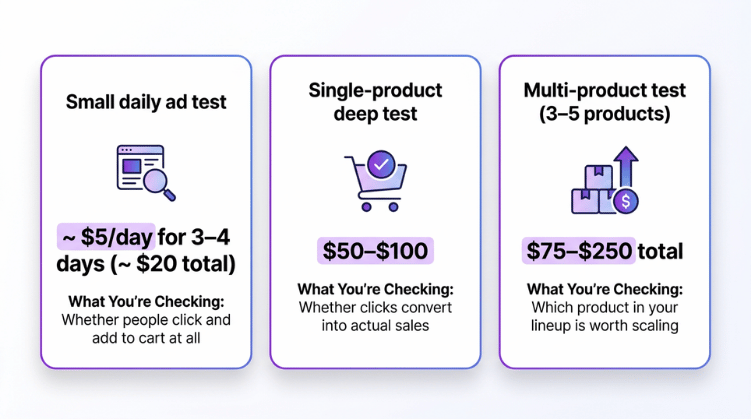
You don't need a big ad budget to know if a product has a pulse. A common approach among dropshippers is to run a small daily budget for a few days per product, then cut it if there's no traction, for example, around $5 a day for three to four days, or roughly $20 per product test.
For context, one analysis of over 1,000 online stores found that a large majority of ad spend goes to a single social platform, with an average conversion rate around 9%80% of total advertising budgets were spent on Facebook, with an average conversion rate of 9.21%, so if you're only testing on one channel, that's usually where beginners start, alongside short-form video platforms for younger, trend-driven audiences.
If a product gets zero engagement after a $20 test in your xPage Drop store, that's your answer. Move on. Don't take it personally, this is exactly why the launch needs to be fast in the first place.
Dropshipping Without Stripe: The Payment Problem, Solved
This is where most "quick start" guides fall apart. You can create a dropshipping website in minutes, but if you don't have Stripe, PayPal, or a registered business yet, you can't actually take a payment, and getting approved for a traditional gateway can take days, or get rejected outright if you're in a country major processors don't fully support.
You generally have a few paths forward:
- A traditional payment gateway (Stripe, PayPal, or similar), works if you're in a supported country with a registered business and can wait out approval
- A local or regional gateway, better coverage for domestic customers, weaker for international cards
- Cash on delivery or bank transfer, works in some markets, but slows down checkout and doesn't guarantee payment
- A managed payment platform, handles the checkout for you without requiring your own merchant account
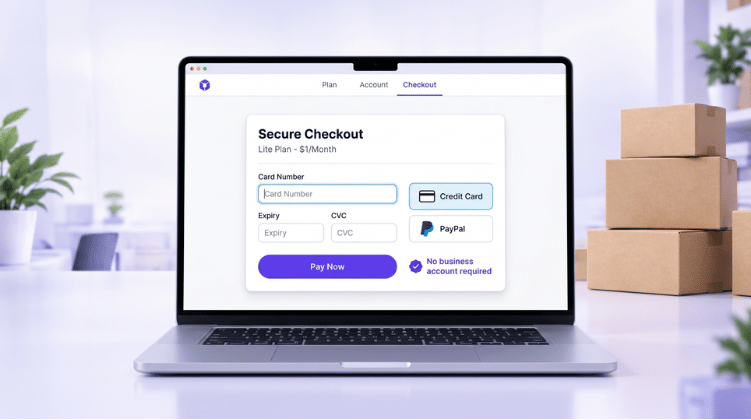
xPage Drop provides a managed checkout option for eligible sellers, allowing customers to make payments without requiring the seller to connect their own Stripe or PayPal account. The platform also manages the order lifecycle through fulfillment, customer support, profit settlement, and eligible seller payouts. This is different from having your own Stripe account: you're using xPage Drop's managed payment infrastructure, with eligibility based on factors such as country, product, and identity verification.
As of publishing, xPage Drop lists a 2.9% + $1 payment fee per order and a 9% handling fee covering fulfillment and buyer support, in addition to product and shipping costs. Fees and pricing can change, so check the current xPage Drop pricing before calculating your product margins.
Product Sourcing and Fulfillment (No Inventory Required)
The other half of a fast launch is not having to buy, store, or ship anything yourself. In xPage Drop, you import a product into your store instead of manufacturing it, and when a customer orders, fulfillment happens on the supplier side rather than in your garage.
xPage Drop's catalog is connected to a managed supplier and fulfillment network, so pricing, shipping cost, and delivery estimates are calculated automatically based on the product's warehouse and the customer's destination. Products may be available from different warehouse regions, including domestic and international options, which is part of why delivery times vary by product rather than being a single fixed number. In practice, this means:
- No large upfront inventory purchase. You pay the supplier cost per order, not per pallet.
- Warehouse location affects delivery speed. A product shipping domestically will typically arrive faster than one shipping internationally, but exact delivery windows vary by product and destination, so don't promise a specific number of days you haven't verified for that route.
- Shipping cost is calculated per order, based on the product's warehouse and the customer's location, rather than a flat rate you have to guess at.
Skip the Fragmented Tech Stack
Here's the part most "how to start dropshipping" guides gloss over: a normal setup requires stitching together five or six separate tools before you can even take your first order.
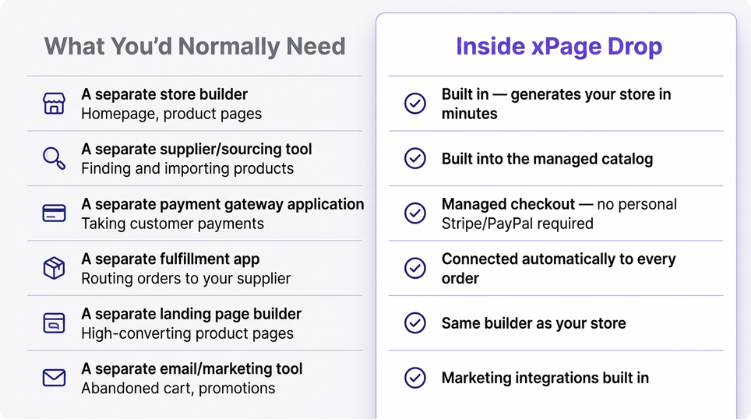
None of the individual tools you'd normally stitch together are bad on their own. The problem is the setup time and approval friction when you stack them all up, especially if this is your first store and you're just trying to validate one idea before committing real money. If your goal is genuinely to create a dropshipping store fast, reducing the number of separate logins and approvals you need is the single biggest time-saver, more than any individual feature.
Common Mistakes When Launching Fast
Speed is only useful if you don't trip over these:
- Skipping the shipping and returns page. Customers check this before buying, even on a one-product store. A clear shipping estimate and return policy build trust fast.
- Not testing your own checkout. Place a real test order before you send traffic.
- Treating revenue as profit. Subtract product cost, shipping, ad spend, and payment/handling fees before you decide a product "worked."
- Setting up a foreign company just to get a payment account. Unless you already have real sales data, this is usually premature, validate the product first.
- Scaling ad spend before checking payout timing. If your payment provider holds funds for review or reserve, make sure you can cover ad spend and supplier costs in the meantime.
Ready to Launch?
You don't need six subscriptions, a business bank account, or a week of setup to launch dropshipping store. Pick one product, let xPage build the store, and use a checkout that doesn't require your own Stripe account.
Frequently Asked Questions
- Can I actually launch a dropshipping store in exactly 10 minutes?
- For a single product with an AI-generated store and a managed checkout, yes — the build itself can take around 10 minutes with xPage Drop. Getting your first sale still depends on traffic and product-market fit, which takes longer.
- Do I need Stripe to start dropshipping?
- No. xPage Drop's checkout lets eligible sellers accept payments without connecting their own Stripe or PayPal account.
- How much money do I need to test a dropshipping product?
- A basic test can start around $20 (roughly $5/day for 3–4 days). A more thorough single-product test runs $50–$100, and testing several products in parallel typically costs $75–$250 total.
- Do I need inventory to start dropshipping?
- No. You pay your supplier per order after a customer buys, rather than purchasing stock in advance.
- Is a one-product store better than a full catalog when starting out?
- For testing, yes. A single hero product is faster to build, faster to advertise, and gives you a clearer read on whether the product itself is the problem.